
Konijn Edit is a simple Mac writing app I built for my own blog. Drafting posts and uploading images all happen in one window, with no jumping back and forth between browser tabs.
Download on the Mac App Store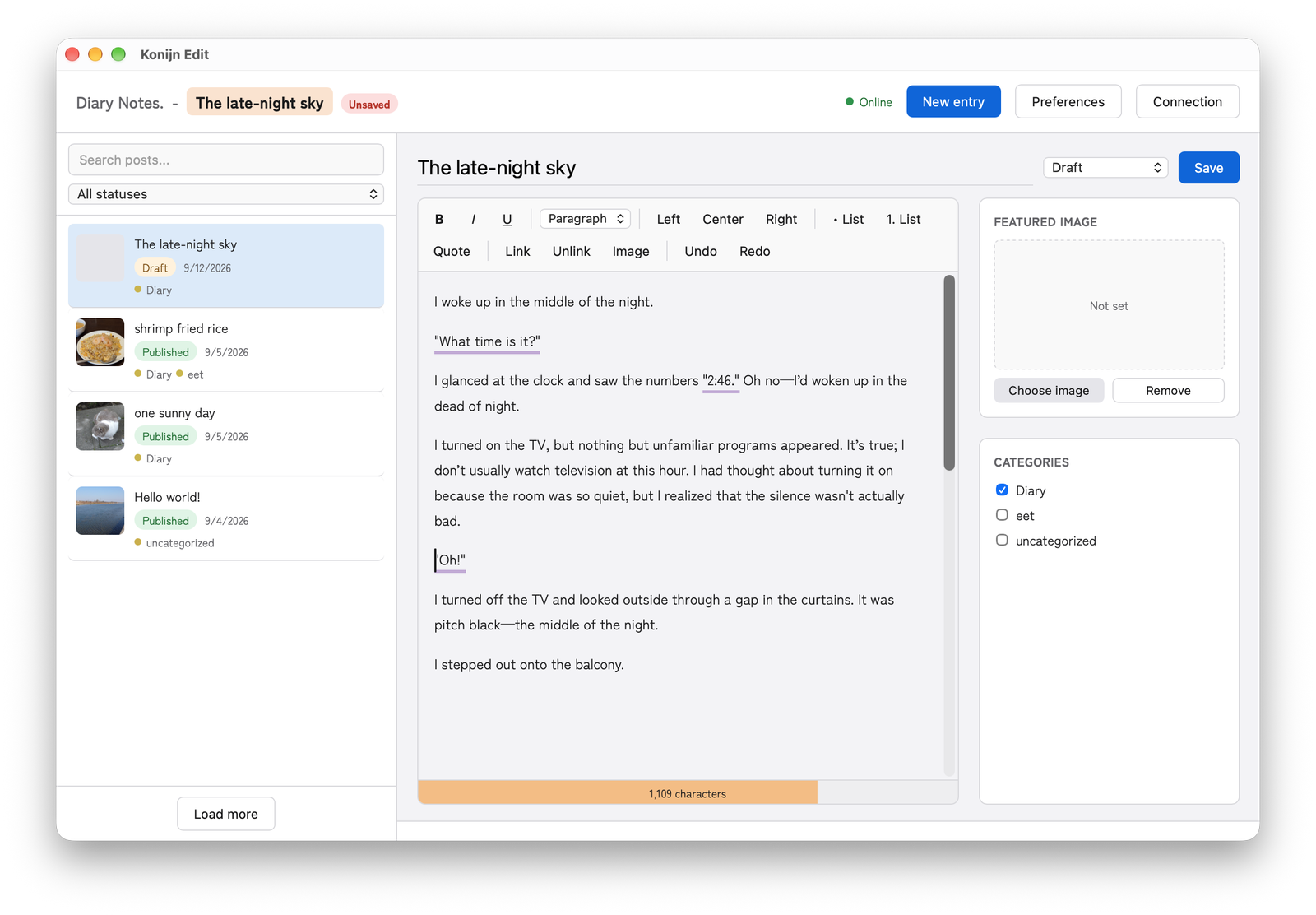
The WordPress admin screen always felt a little heavy to me, even after years of use. Handling images in the media library, and writing with a pile of browser tabs open, kept pulling my attention away from the writing itself.
Konijn Edit is a personal tool I made only to reduce that friction. It brings the post list, the editor and image uploads into a single window, so it is easier to get back to writing.
“Konijn” means “rabbit” in Dutch. Setting black letters down on a white page looks a lot like a rabbit leaving tracks across a snowfield. The rhythm of leaping from one thought to the next, and the way a jump sometimes lands somewhere unexpected and turns into a new idea, both feel a little like a rabbit’s hop. That is the image the name comes from.
A character-count bar sits below the text and changes color as you write more. You can feel “this is getting long” without reading the number. The counts at which the color changes can be adjusted to your own way of writing.
Text enclosed in double quotation marks (" " or “ ”) or in the Japanese brackets 「」 and 『』 is underlined automatically, so dialogue and quotations stand out at a glance. If a straight " or a 「」 or 『』 bracket is left unmatched, such as one that is never closed, you are told right away.
She smiled and said, "Tomorrow is a day I won't forget," as if it were almost a secret.
彼は「明日は『特別な日』だよ」と囁いた。
When you save or publish, it gently points out only the things that are easy to forget. Nothing rushes you; it is a modest confirmation that appears only when it is needed.
You have unsaved changes. Quit without saving?
No category is selected. Publish anyway?
No featured image is set. Publish anyway?
Enter your WordPress site URL and an application password you have issued.
Create a new entry, or pick an existing post from the list to edit.
Saving a draft and publishing as is are both done with a single button.
Latest version1.0.5
Konijn Edit is available on the Mac App Store. The story of how it was made is in my development log on note (in Japanese).
Questions and bug reports are welcome at the address below.
 Konijn Edit